At a glance
Choose error correction in Standard- L, M, Q and H are commonly described as about 7%, 15%, 25% and 30% codeword restoration. These are not percentages of the picture you may cover.
- More correction may require more modules. At a fixed overall width, smaller modules can be harder to capture clearly.
- Scanfolk starts at M without a logo and uses H when a logo is present. Check the actual exported QR and its final placement.
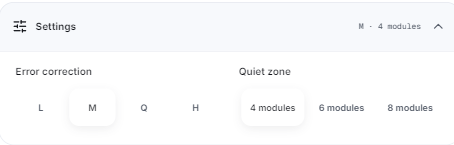
What do L, M, Q and H mean?
Error correction adds redundant information so a reader can reconstruct some damaged encoded data. QR codes use Reed–Solomon error correction. A codeword is an eight-bit unit; recovery percentages refer to codewords, not the visible area of the image.
Treat the levels as a tradeoff to test, not four promises about how much of a QR can disappear. The location and shape of a defect matter, and a scanner must still locate and sample the symbol.
A practical starting point
| Level | Approximate restoration | When to consider it |
|---|---|---|
| L | 7% of total codewords | A clean, protected setting where reducing density matters; verify the final size. |
| M | 15% of total codewords | An ordinary QR without a logo; the Scanfolk default. |
| Q | 25% of total codewords | A setting where dirt or handling is plausible, with enough room for the resulting symbol. |
| H | 30% of total codewords | Greater redundancy when needed; Scanfolk uses H for a logo. Test rather than assuming it will scan. |
Why a higher level can make the QR denser
For the same content, extra correction information can push the encoder into a larger QR version. A larger version has more modules per side. The change happens in steps: two levels may fit the same version, so density does not increase on every selection.
Our short example, https://example.com/qr-check, produced L at version 2 (25×25 modules), M and Q at version 3 (29×29), and H at version 4 (33×33). All four contain the same complete URL. These counts exclude the four-module quiet zone on each side.
With a 240-pixel total width including that border, a module spans about 7.27 pixels at L and 5.85 pixels at H in this example. Increasing the displayed or printed size can preserve module size. A shorter destination can also reduce density, though changing the URL changes what is encoded.

How to choose a level in Scanfolk
Open Standard and enter your content. Start with a plain Square QR and a dark foreground on a light background. Expand Settings, then choose L, M, Q or H under Error correction. The preview updates to the newly encoded symbol.
For a QR without a logo, M is the initial setting. Compare levels at your intended final size and keep the same destination while testing. Save a fresh export after changing a setting; an old downloaded file does not update itself.
Keep the quiet zone at least four modules wide. Scanfolk offers 4, 6 or 8 modules. Error correction does not replace that border, adequate contrast or sharp rendering. If the result becomes too dense for the placement, give it more space or simplify the content before reducing correction purely to make it fit.
What happened in our controlled damage test?
On October 15, 2026 we rendered two synthetic URLs at L, M, Q and H using the current Standard renderer, Square modules and finders, a dark foreground, white background and four-module margin. The encoder selected the version and mask separately for each payload and level.
For each symbol we kept a clean control, then overwrote a centered horizontal band of 1, 3, 5, 7 or 9 modules with white across the full symbol width. We kept the border and three corner finders intact; a band could cross alignment, data and correction modules. This controlled overwrite is not a model of every scratch or stain.
We saved all 48 fixtures at 1024×1024 pixels, resized them in RGB with Lanczos to 256, 512 and 1024 pixels, and decoded each condition once with ZXing-C++ 2.3.0. Across 144 digital checks, 63 matched exactly and none returned a different QR payload. All 24 clean checks matched.
For the short URL, H decoded in all three sizes with a three-module band and failed in all three with a five-module band. The longer H example decoded even with a nine-module band. Payload length, version, mask and band area relative to the symbol also changed, so this does not isolate correction level or establish a universal damage threshold. Retained failures are part of the result.
Short URL: exact matches across three sizes
| White band | L | M | Q | H |
|---|---|---|---|---|
| None · control | 3/3 | 3/3 | 3/3 | 3/3 |
| 1 module | 0/3 | 3/3 | 3/3 | 3/3 |
| 3 modules | 0/3 | 0/3 | 0/3 | 3/3 |
| 5 modules | 0/3 | 0/3 | 0/3 | 0/3 |
| 7 modules | 0/3 | 0/3 | 0/3 | 0/3 |
| 9 modules | 0/3 | 0/3 | 0/3 | 0/3 |

Does H make it safe to cover 30% with a logo?
No. Codeword restoration is not an allowance to cover 30% of a square. A logo removes specific modules, and its backing area can be larger than the artwork itself. Essential patterns, geometry, contrast and the destination all affect the outcome.
Scanfolk switches to H when a logo is added. That does not authorize enlarging the logo or editing the exported QR beyond its tested design. Keep the generator’s protected center and test the complete logo export. Removing a logo lets you choose a lower level again.
Artistic QR generation is a separate workflow. The four Standard settings do not prove that an AI image, texture or visual template will scan; the finished artistic artifact needs its own exact-payload validation and placement test.
Test the finished QR, whatever level you choose
First decode the saved export and compare the complete data. Then scan it on the phones your audience uses and complete the intended action. Test the QR again after layout changes, platform compression and printing at its actual size.
If a clean QR fails, check the destination, clear border, contrast, module size and rendering before assuming more correction will solve it. Increasing from M to H can add redundancy while making modules smaller at the same overall width. Change one variable at a time and retain failures.
These levels do not affect whether a direct QR expires or whether a hosted tracking link stays available. Error correction concerns reading the stored data; the destination and any redirect service still need to work.
Sources and review
Reviewed by the Scanfolk editorial team on October 15, 2026. Original interface capture and 48-fixture digital experiment dated October 15. Results describe two URLs and one controlled damage geometry, not a phone/print success rate or safe logo coverage. All failed decodes are retained.